XMatrix Command Interface: one line of text commands the whole motor
XMatrix is the software system of XMSP. This page is the command-interface function, code Command, English name Command Mode. Motion control is inside the device. One line of ASCII moves, homes, or reads status. The published transport is UDP.
- IP : 6000Command port
- A / D / P / V / ZCommands used most
- /addressMulti-axis daisy chain
- Any languageA string is the interface
What it does
The XMatrix Command Interface opens the motion-command interpreter inside the device, so motion can be programmed and called from code, repetitive work can be automated, and a longer workflow can be built. One line of ordinary text moves the motor, homes it, stops it, reads status, or addresses several devices. You do not start from motor parameters, drive parameters, and low-level motion-controller code.
It addresses the usual motor-control stack: an external motion controller, a complicated pulse harness, a different interface on every drive, and commissioning and integration done over again. The published implementation carries ASCII commands over UDP. It fits a host application, industrial software, a script, an embedded system, an IoT device, or a local AI tool.
- Absolute position, relative move, continuous run, and homing.
- Change speed, acceleration, enable, and emergency stop.
- Read current position, limits, alarms, and whether the axis has been homed.
- Daisy-chain several units over Ethernet and separate axes by address.
- Combine loops, waits, and I/O so a repeated move is a short command sequence.
How to do it
- Put the PC or host and the MSP device on the same network, and switch the device to the UDP mode used by the command interface.
- Send an ASCII string to the programming port on the device IP. The usual factory port is
6000. - First send
hto confirm communication and device status, then enable, home, and send a motion command. - Daisy-chain several devices over Ethernet. Prefix the command with
/addressto choose the axis that executes it.
Short commands and a first example
| Command | Example | Meaning |
|---|---|---|
A | A10000 | Move to absolute position 10000 |
D | D1000 | Move 1000 in the negative direction from the current position |
P | P1000 | Move 1000 in the positive direction from the current position |
V | V500A1000 | Move to absolute position 1000 at 500 rpm |
Z | v100Z1000 | Home at 100 rpm, then offset 1000 and take that point as zero |
z | z0 | Do not move the motor; count the current position as 0 |
/ | /0A0 /1A100 /2A200 | Three devices move to 0, 100, and 200 |
On the first link, send in this order. Wait for the reply before the next command:
h               # query status and confirm the network is up
E1              # enable the drive
v50Z1000        # home at 50 rpm and offset 1000 as the zero
V200A10000      # move to absolute position 10000 at 200 rpm
Common sequence patterns
A0 A1000                 # go to 0, then to 1000, once
g A0 A1000 G10           # loop between 0 and 1000, 10 times
g A0 A1000 G             # loop until a separate stop command
A0 W1000 A1000 W500      # go to 0, wait 1 s, go to 1000, wait 0.5 s
/0 A0 /1 A100 /2 A200    # several axes arrive at different positions
Detail
The XMatrix Command Interface keeps the motion-control detail inside the device. Below: network setup, commissioning steps, command rules, multi-axis daisy chain, program access, and what the site needs.
Shared configuration, commissioning, and parameters
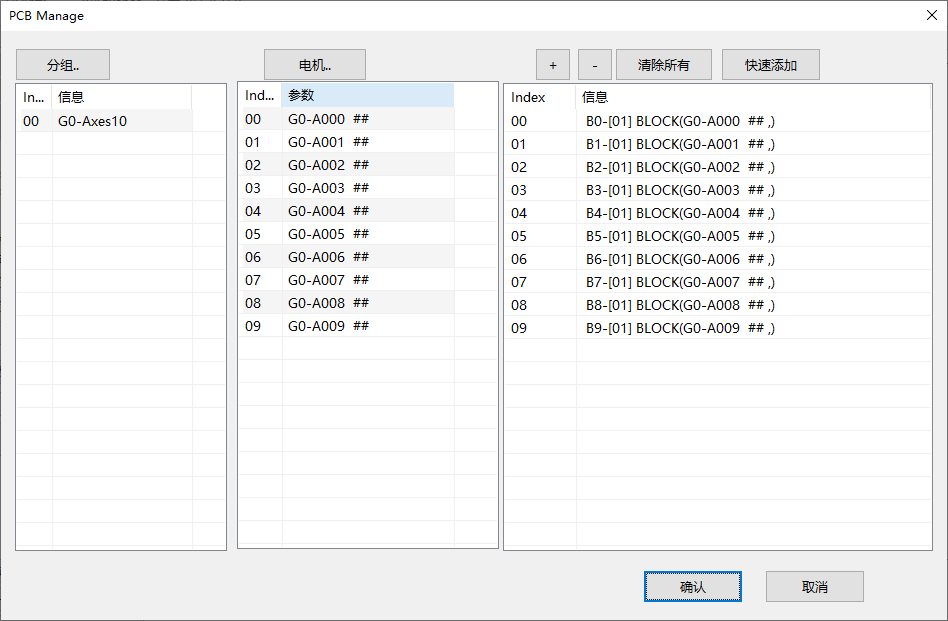
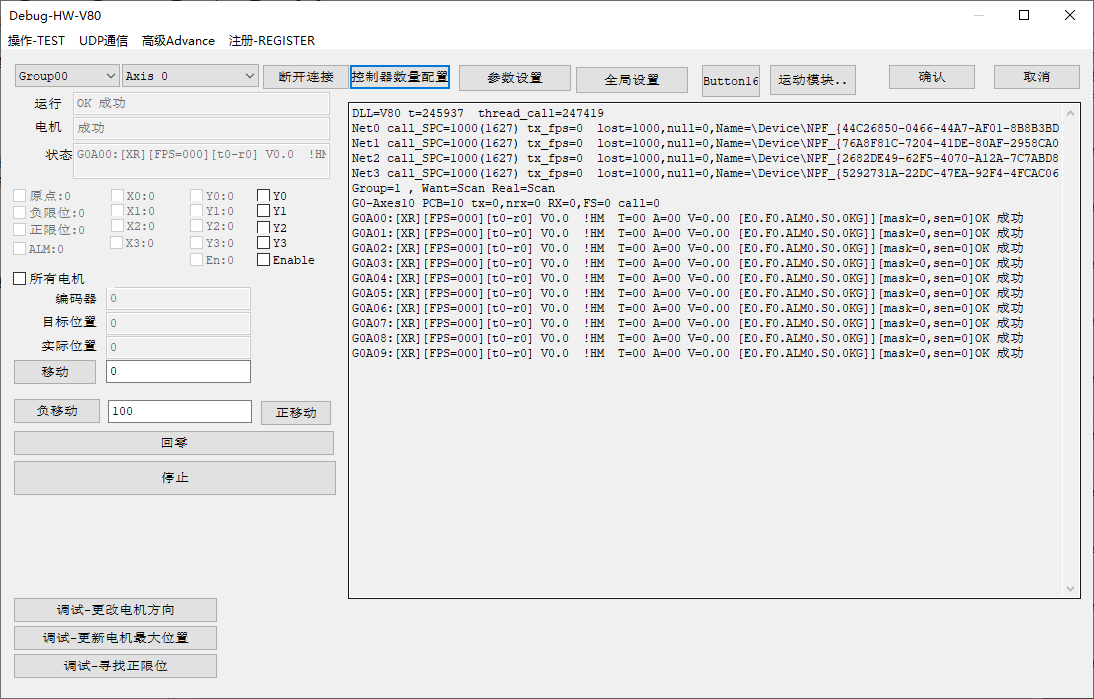
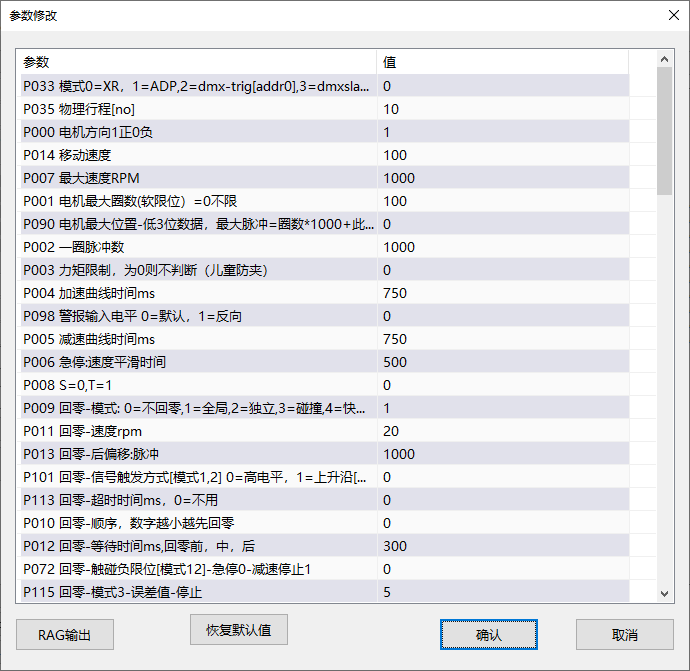
This software function shares the MSP device foundation with the other XMatrix entries. Configure groups, axes, and motion modules, check home, limits, direction, and homing, then set speed, acceleration, travel, and protection. Enter the software mode on this page only after that foundation is done.
Where it sits
The XMatrix Command Interface puts industrial motion control, a command interpreter, and network communication in the same MSP hardware. The controller side only states where to move, how fast, and when to stop. The device handles acceleration, homing, limits, and errors.
- Simpler integration: No extra motion card or pulse module. An Ethernet command runs the motor.
- More freedom on the development side: The programming language and the shape of the host are not fixed. Existing software, an IoT system, or a local AI tool can connect.
- One multi-axis logic: Stepper, servo, and the MSP1001 path use the same commands and the same addressing, so the integration is not repeated for each path.
- Room to extend: Beyond the standard commands you can request the full protocol, or a command set and software interface for the project.
How to connect the network
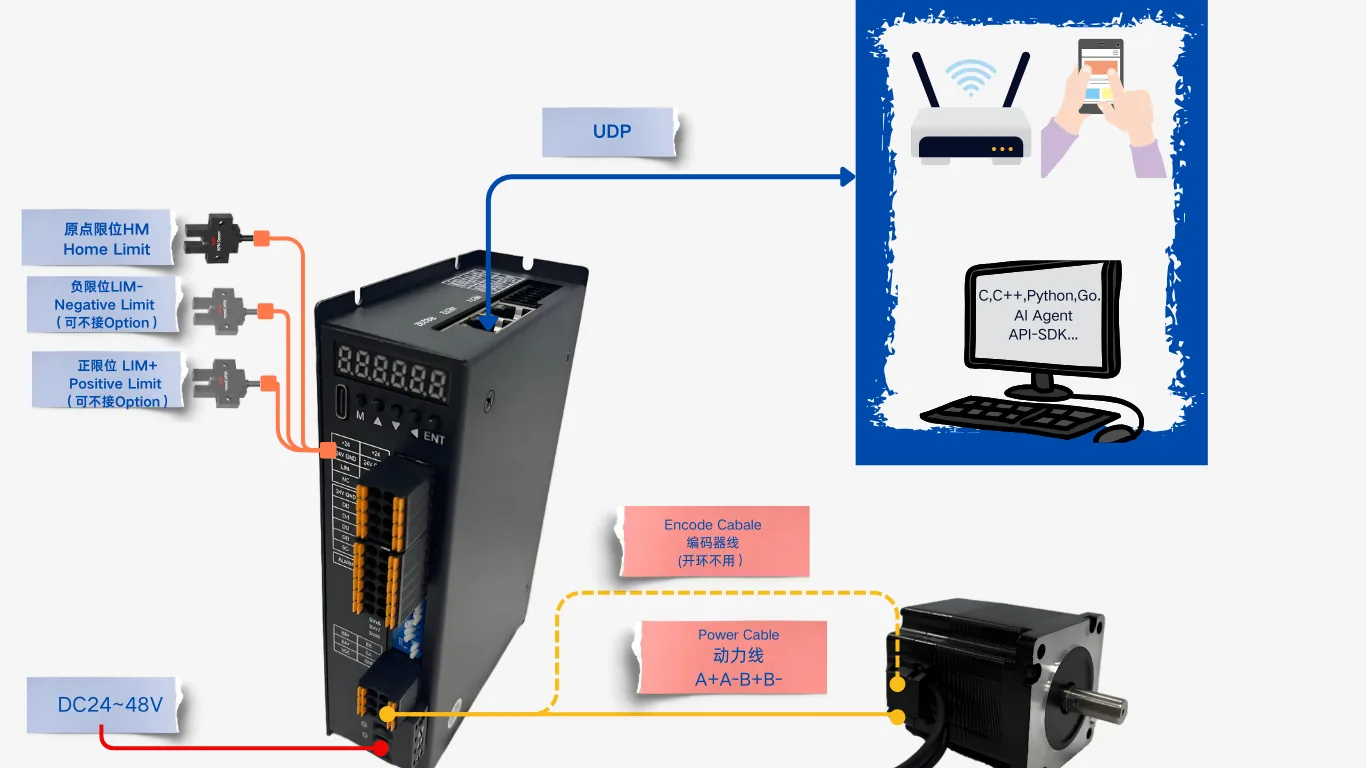
The host sends commands over UDP. Home and the positive and negative limits connect to 24 V I/O.
Use an ordinary Ethernet cable and put the PC and the device on the same subnet. A direct cable or a switch both work.
| Item | Factory default | Description |
|---|---|---|
| Device IP | 192.168.1.199 | Change the four fields under network-port IP in the commissioning software. Power-cycle after the change. |
| Programming port | 6000 | Commands are sent to this port |
| Show-control port | 9999 | Reserved for show-control software. Usually left as it is. |
| Operating mode | Set it to UDP | In the commissioning software, set Mode to 1 = UDP, then power-cycle. |
Set the PC IP on the same subnet, for example 192.168.1.100. Ping the device first, then send text with a network tool to 192.168.1.199:6000 send text.
/station to select an axis further along. Confirm the head unit and each station address in the commissioning configuration. Do not treat one daisy chain as several independent network devices and send packets to each.Commissioning steps, short form
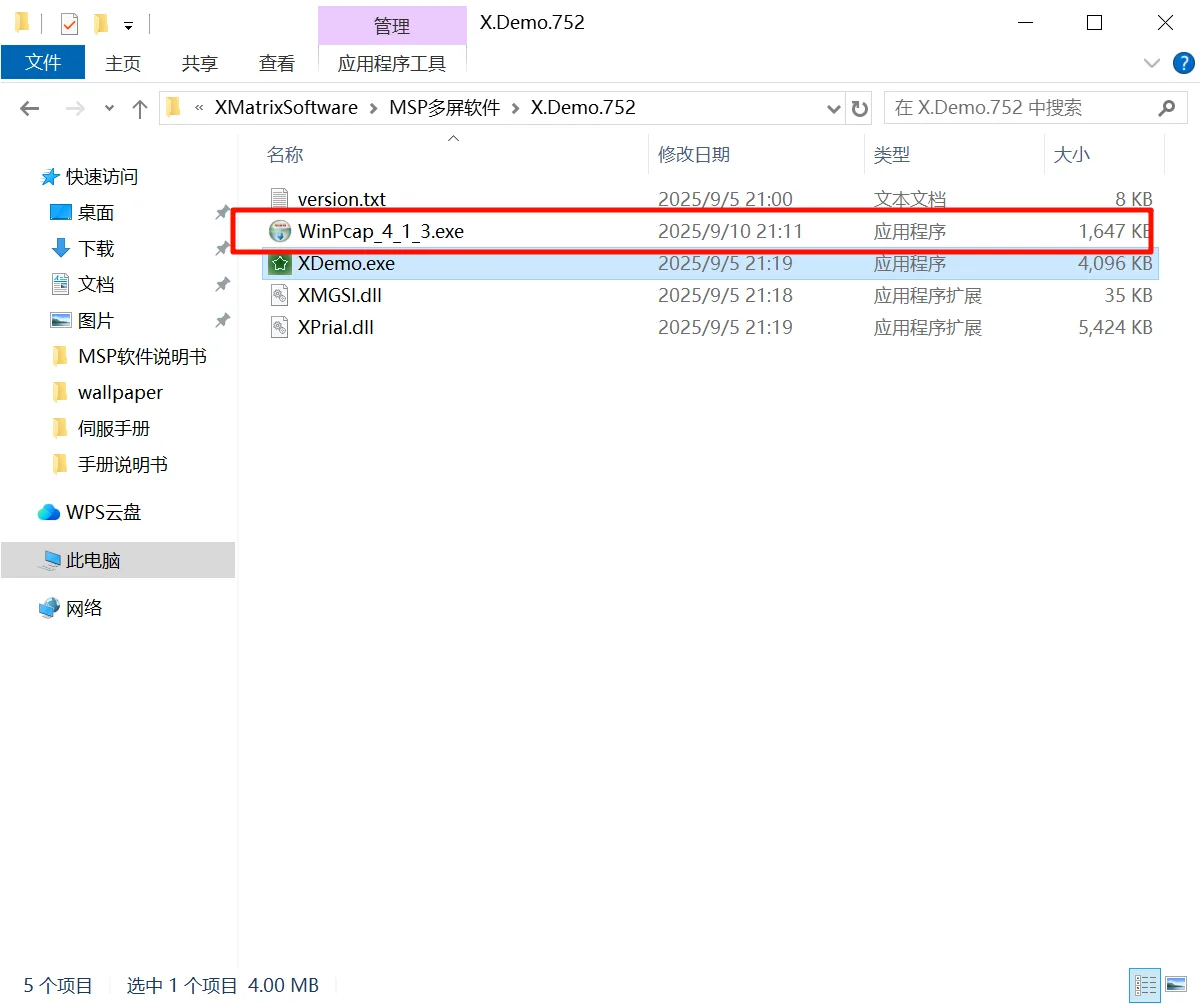
- Unpack the commissioning software and install WinPcap the network driver first (once per PC; if you use a USB Ethernet adapter, plug it in before installing). Then start the commissioning software.
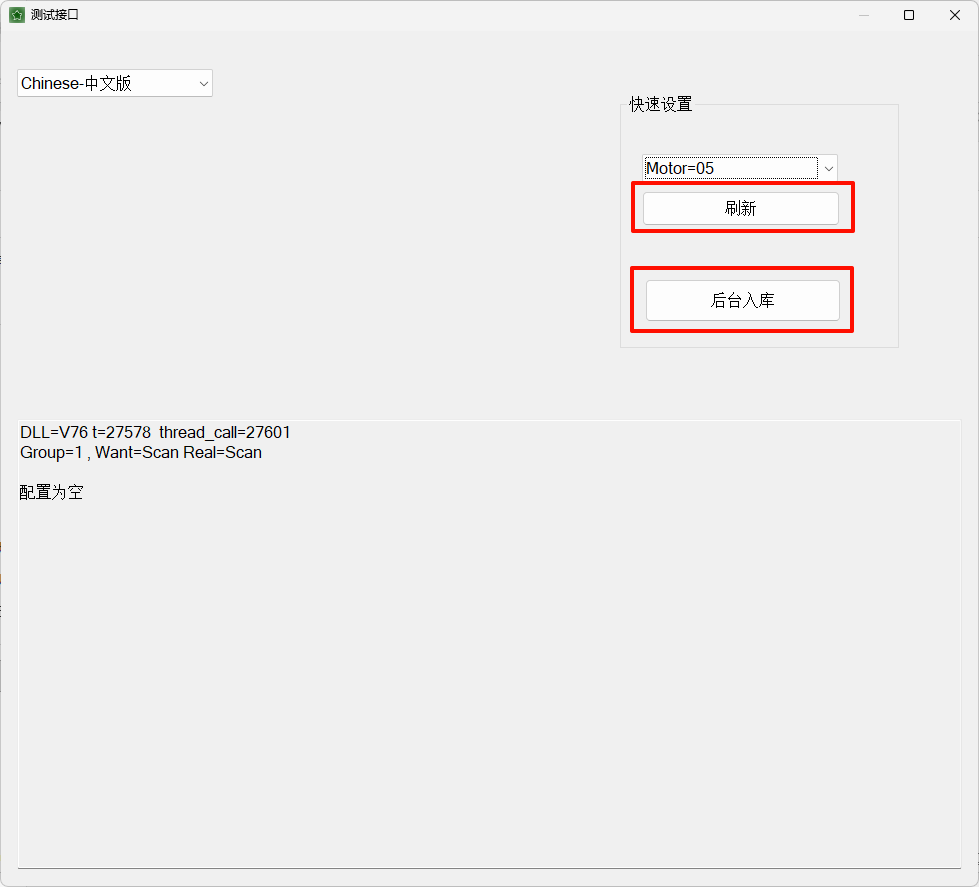
- Choose the motor-module count, refresh, and store in the background. If a confirmation password is requested, enter what the software on site asks for.
- Open parameters and set Mode to 1 = UDP. After you confirm, the device restarts.
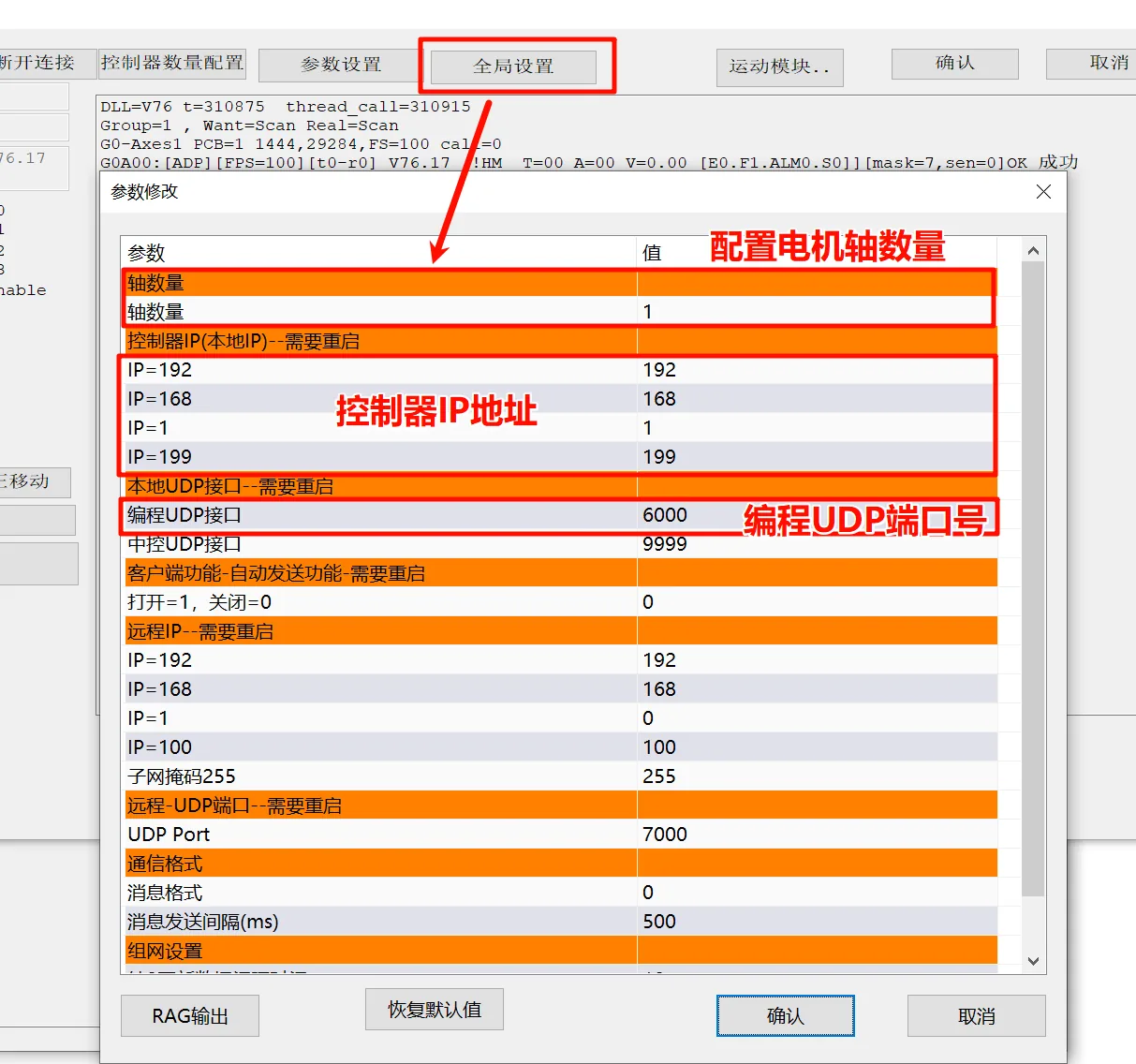
- Global settings: check axis count, controller IP (default 192.168.1.199), and programming port (6000). After an IP or port change, power-cycle the controller or the new value does not apply.
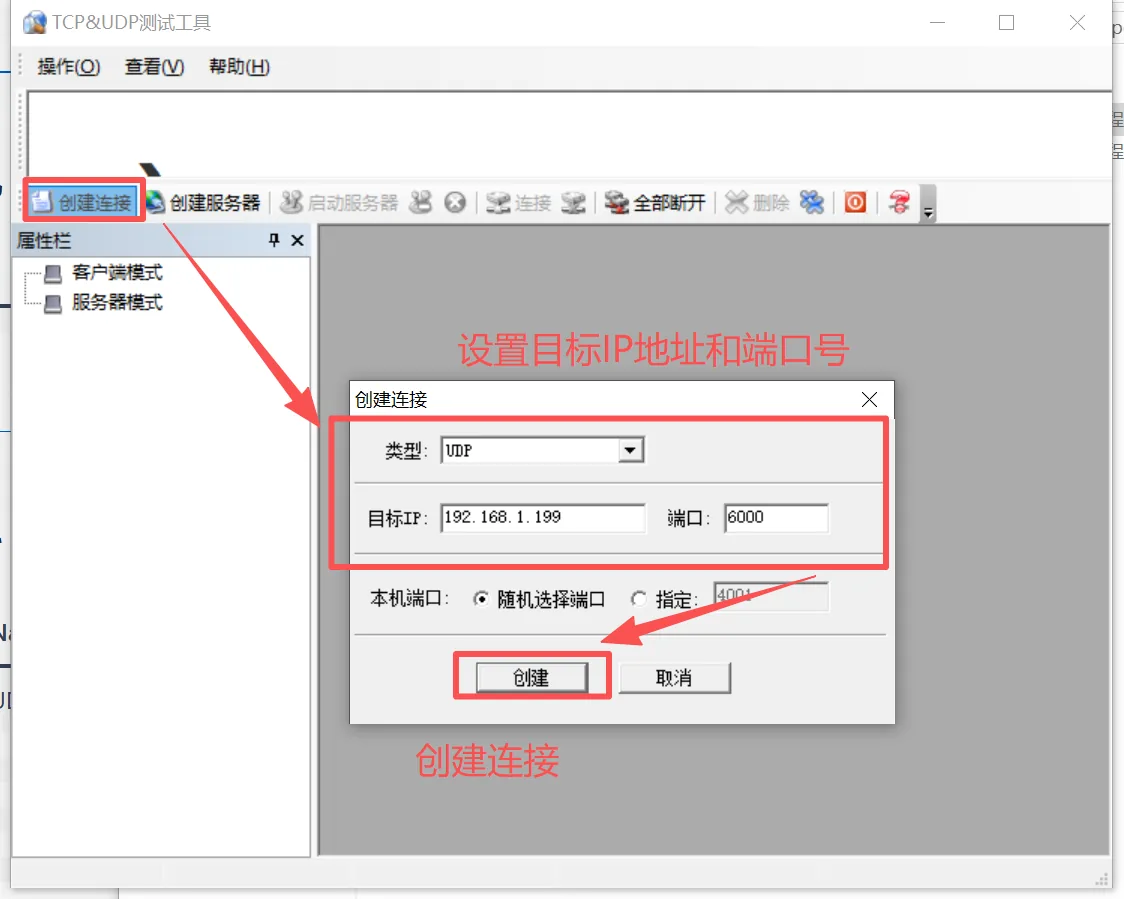
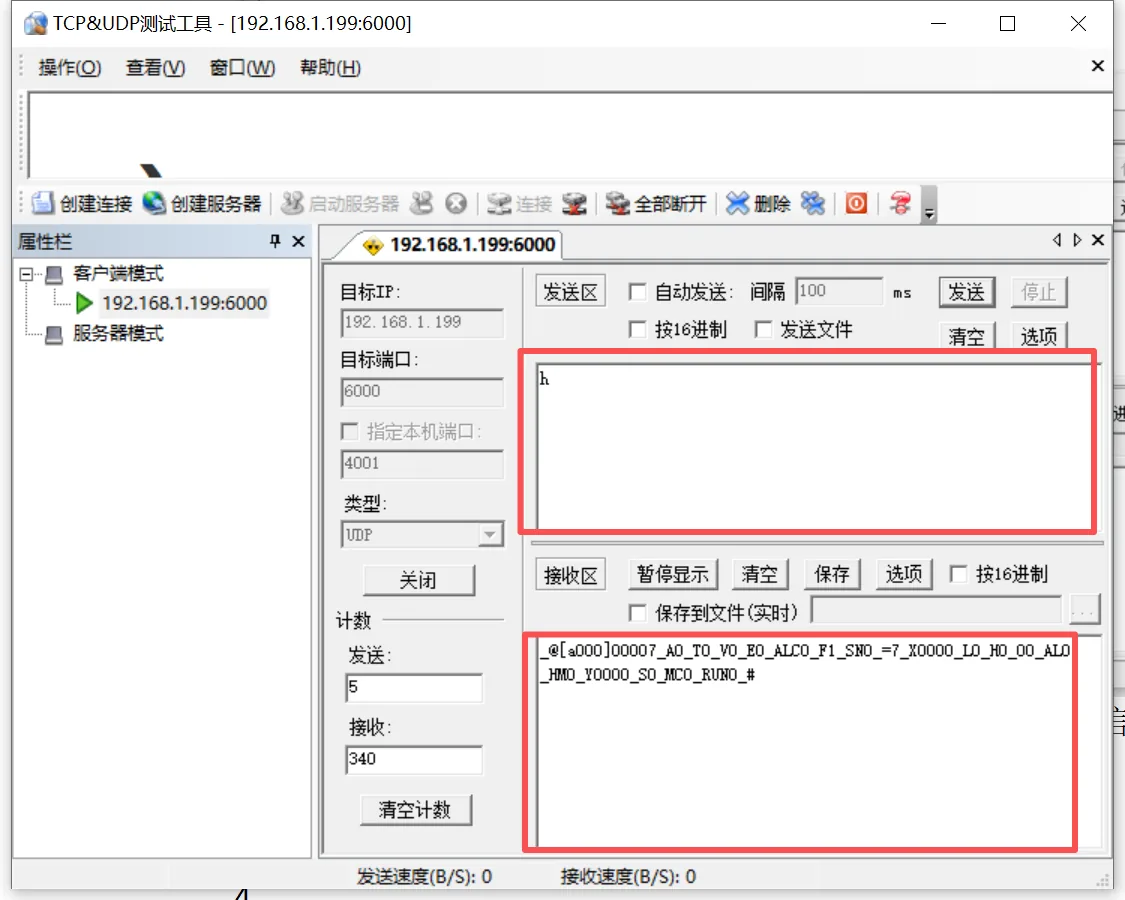
- Create a connection in a UDP network tool (type UDP, target IP, port 6000). First send
hto read status, then send a motion command to verify.
How a command is written
- One command = one letter + an optional integer. Commands can be concatenated. Spaces are optional.
- Case sensitive:
Vis move speed,vis homing speed;Zhomes,zchanges the current-position count. - The position unit is pulses, the speed unit is revolutions per minute (rpm), and wait time is milliseconds.
- One datagram holds about thirty commands at most. Wait for the reply. Do not stream the next datagram immediately.
- An unrecognized letter fails the whole datagram, and the motor stops.
A10000P500          # absolute 10000, then a positive relative move of 500
V100 A1000          # the space does not matter
V1000A1000          # same result as the line above
Command list (the common ones)
| Command | Form | What it does |
|---|---|---|
A | A10000 | Move to absolute position 10000 |
P | P1000 | Move 1000 in the positive direction from here. P0 = run positive continuously at the current speed |
D | D1000 | Move 1000 in the negative direction. D0 = run negative continuously |
V | V200 | Speed used by later moves, in rpm |
v | v50 | Speed used for homing, in rpm |
Z | Z1000 | Find home. The number is the offset traveled after home is found, and that point becomes the new 0. |
z | z0 | The motor does not move. Only the current-position count is changed to this number. |
E | E1 / E0 | Enable / disable the servo |
t | t0 / t1 | Stop: 0 decelerates to a stop, 1 is an emergency stop |
W | W1000 | Wait 1000 ms, then run the following commands |
Y | Y11 | Digital output. The tens digit is the channel, the units digit is the level. |
h | h or h15 | Query status. No motion. The number selects which fields come back. |
One unit and several units
Each device has a station address in the commissioning software. The factory value is usually 0. Several units must all differ.
- Prefix the command with
/station. Only that unit runs what follows, until the next/. - Without
/, this unit (and any axis that receives the broadcast) runs the command.
/0 A0 /1 A100 /2 A200    # three units move to 0, 100, and 200
V150 /1 A5000            # set one speed, then move only station 1 to 5000
Integration example
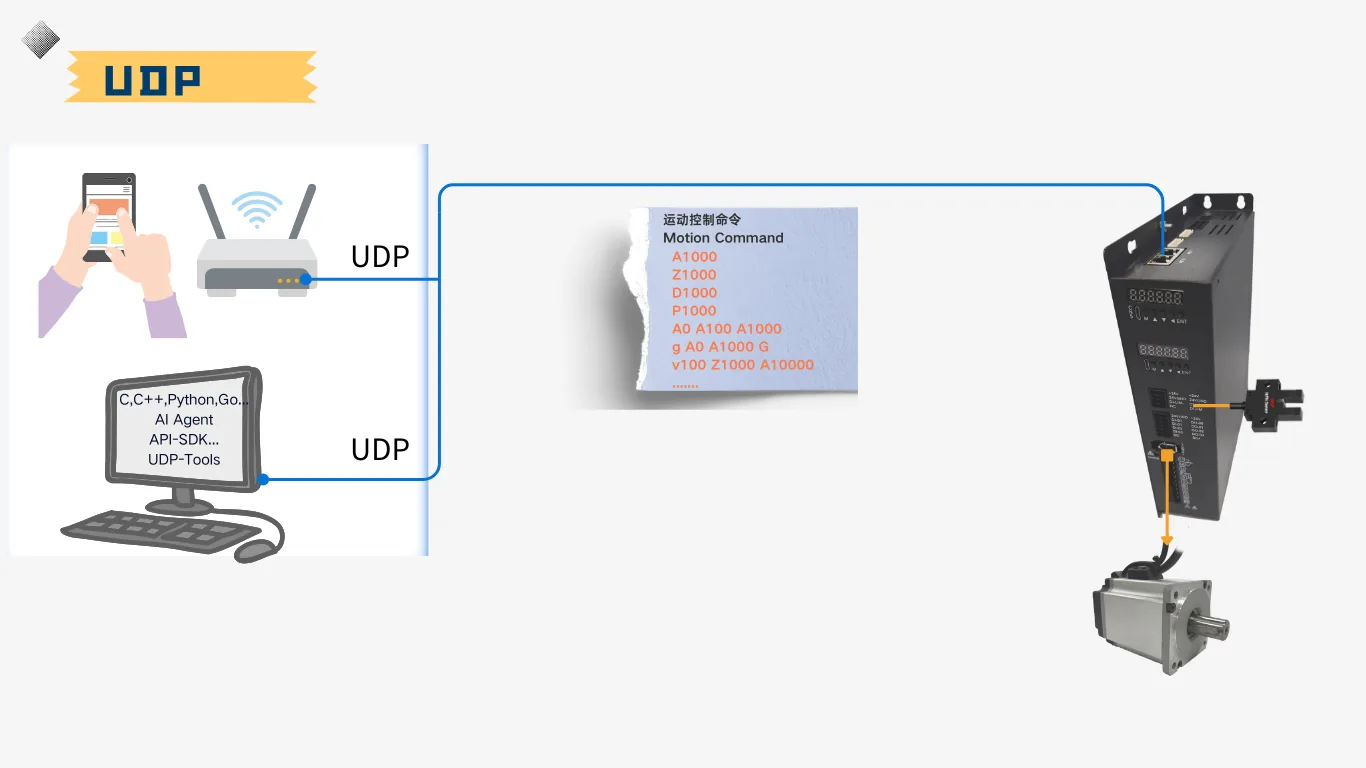
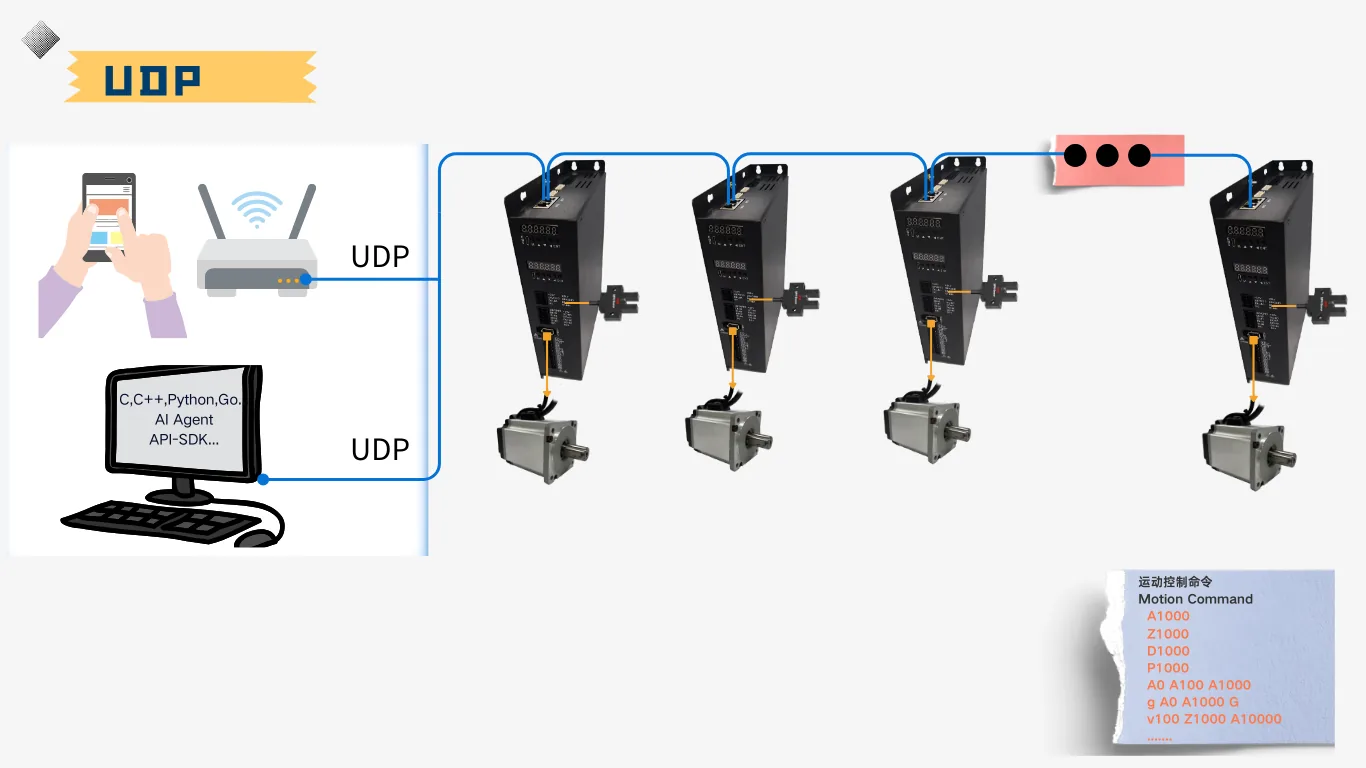
Any language: what leaves the socket is one line of ordinary text. The Python below is the minimum flow. A network test tool (a TCP and UDP tester) is the same: create a UDP connection, fill in the device IP and 6000, and send the command from the send pane.
import socket

device = ("192.168.1.199", 6000)
s = socket.socket(socket.AF_INET, socket.SOCK_DGRAM)
s.settimeout(1.0)

def send(command):
    s.sendto(command.encode("ascii"), device)
    reply, _ = s.recvfrom(1024)
    return reply.decode("ascii", errors="replace")

print(send("h"))
print(send("E1"))
print(send("v50Z1000"))
print(send("V200A10000"))
Z and confirm the axis has homed. P0 / D0 keeps turning. You must send t0 / t1 to stop.Matching hardware
The XMatrix Command Interface covers how the command is sent. For the command to move the axis, and to move it safely, the site still needs the items below.
| What you need to do | What to fit | Where it connects |
|---|---|---|
| Home / find the origin | Slotted optical sensor ×1 | Controller HM |
| Positive and negative limit protection | Slotted optical sensors ×2 (or software limits only) | Controller LIM+, LIM− |
| Hold a vertical axis when power is removed | Brake motor + 24 V relay + brake cable | Controller DO through a relay |
| Multi-axis coordination | Ethernet cable (daisy chain) | Controller Ethernet port |
| Turn rotation into linear travel | Gearbox / leadscrew / belt stage | — (parameter scaling) |
The full map is in XMatrix Features × MSP Hardware. Accessory categories and models are in Accessories and matching parts.
Common questions
| Symptom | Look here first |
|---|---|
| No reply at all | Are the PC and the device on the same subnet? Is the mode UDP? Was the packet sent to the head of the daisy chain? Is a firewall blocking UDP? |
| The reply says the command is not recognized | Letter case, or an extra letter that is not supported |
| The reply is OK, but the motor does not move | Was E1 sent? Has the axis been homed? Limits, direction, and alarm state |
| Only the head unit moves | Are the later station addresses set, and does the command include the matching /station |
| The motor keeps turning and will not stop | You previously sent P0 or D0. Send t0 |
| The IP was changed, but the old address still answers | After an IP or programming-port change, power-cycle the controller |
| Parameters or the background page will not open | Enter the password the software on site asks for. Request the rule from technical support. |