Two-phase stepper, frame 20–86
MSP integrated stepper drive
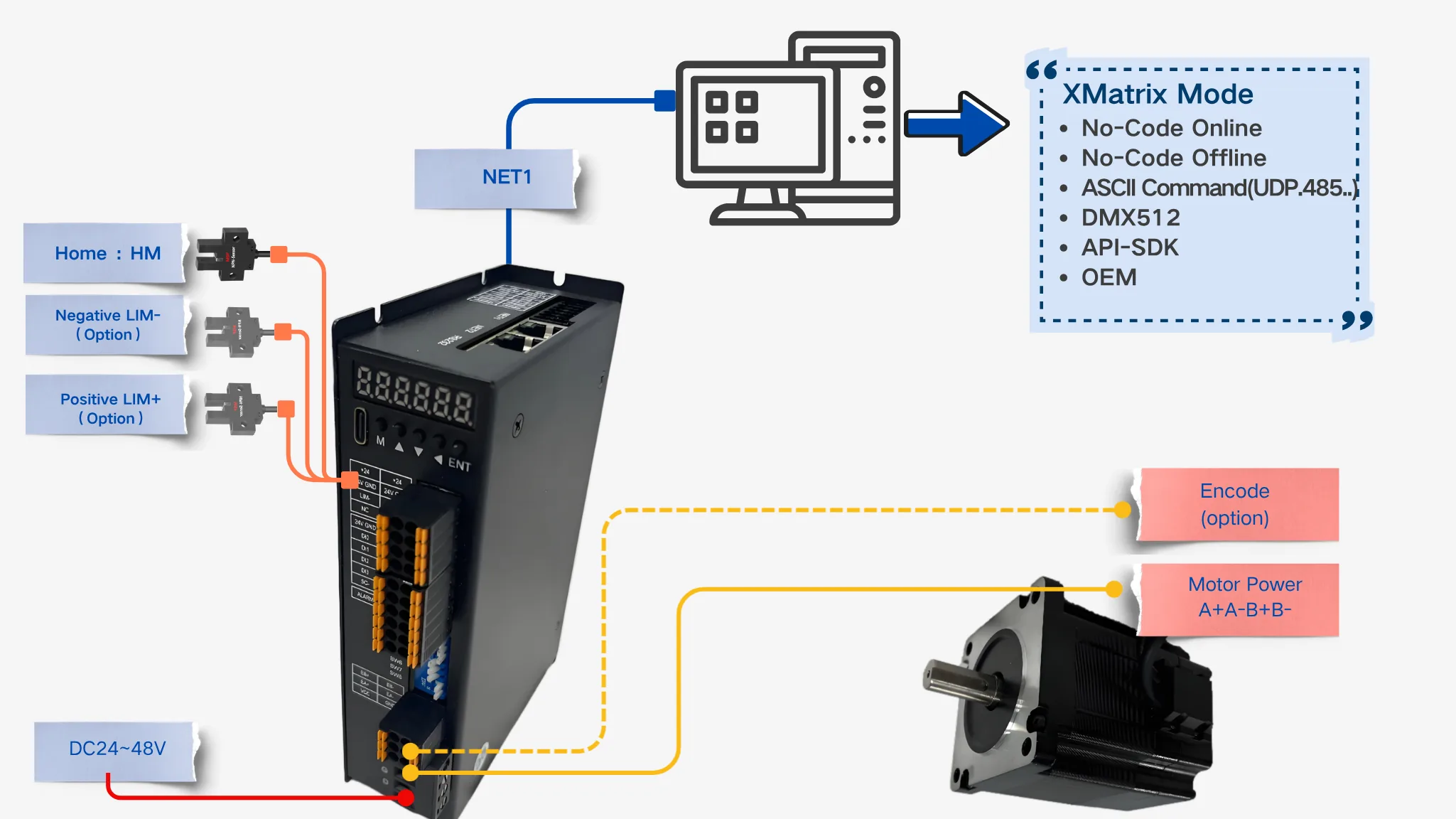
Motion control and the stepper drive are in one unit. The controller connects directly to the motor.
DC 24–48V · open-loop / closed-loop
Open the stepper page →MSP is the hardware part of XMSP. Three MSP controllers connect to XMatrix software. Choose the path from how the motor is connected; wiring and ratings are below.
Choose the path from the motor and drive you already have. You do not need to memorize MSP model numbers first.
| Your situation | Start here | Next |
|---|---|---|
| Drive a two-phase stepper directly | MSP Integrated Stepper Drive | Select by frame size 20–86 |
| Drive an AC servo motor directly | MSP Integrated Servo Drive | Select by 100 W–1500 W |
| A drive is already installed, or the rating is outside the standard range | MSP1001 Single-Axis Motion Controller | Confirm the direction / pulse interface |

MSP57 / MSP400 / MSP1001.
Motion control and the stepper drive are in one unit. The controller connects directly to the motor.
DC 24–48V · open-loop / closed-loop
Open the stepper page →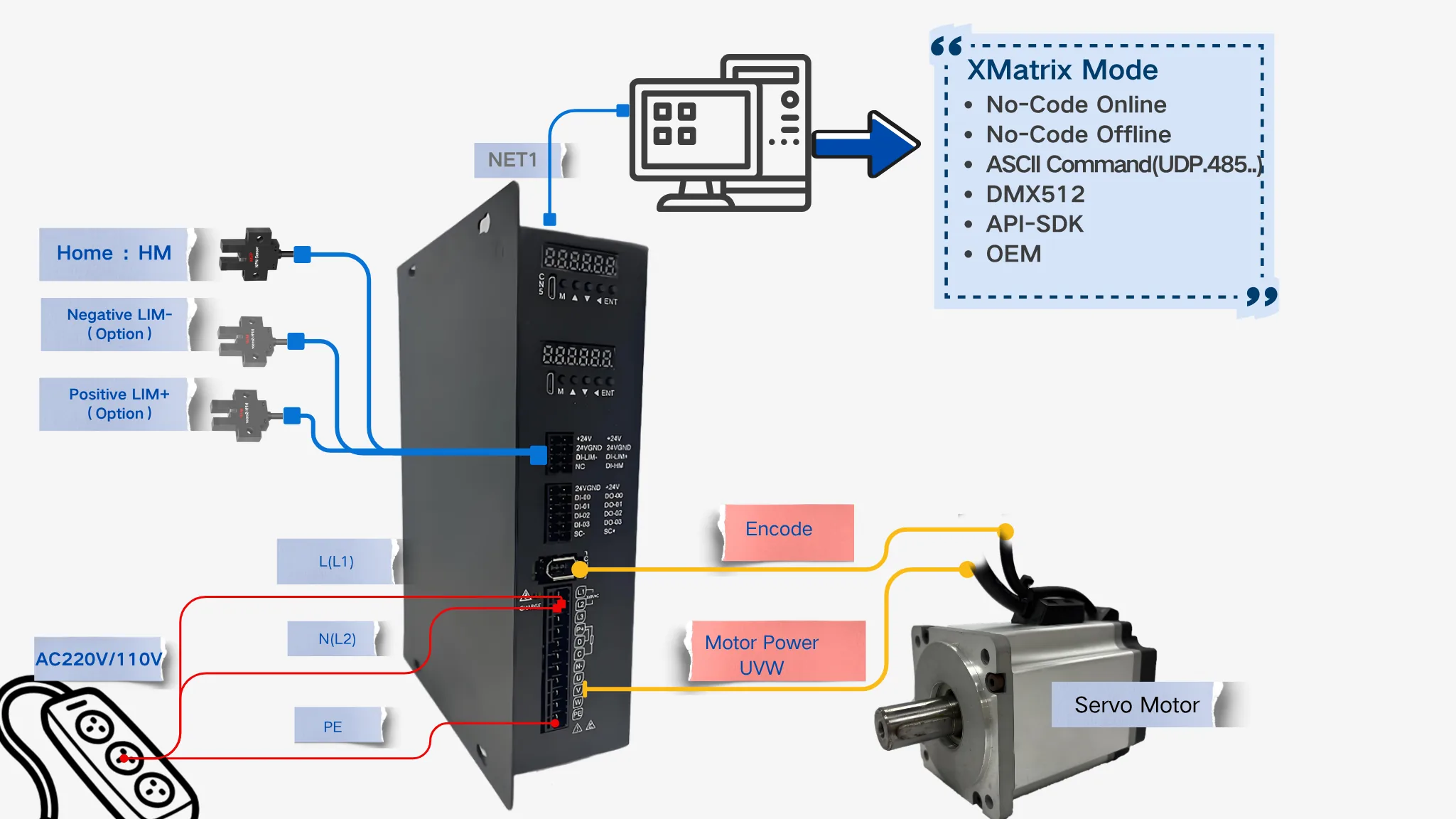
Motion control and the servo drive are in one unit. Power and encoder cables connect directly.
AC 220V · incremental / absolute
Open the servo page →
It outputs direction / pulse so a third-party drive with a matching interface can enter the XMatrix software system.
AC 110–220V · 5V · 100 kHz
Open the MSP1001 page →The table compares parameters already published for the three controllers. The last two columns are whether a gearbox can be fitted and what else the site still needs.
| Family | Order-code pattern | Matched motor range | Supply | Published range | Gearbox | Parts required |
|---|---|---|---|---|---|---|
| MSP Integrated Stepper Drive | MSP20 / MSP28 / MSP35 / MSP42 / MSP57 / MSP60 / MSP86 | Frame 20 / 28 / 35 / 42 / 57 / 60 / 86 stepper motors | DC 24–48V | Open-loop / closed-loop | Yes (planetary / worm) | Cables; slotted optical sensors for home / limits; a brake needs a 24 V relay |
| MSP Integrated Servo Drive | MSP100 / MSP200 / MSP400 / MSP750 / MSP1000 / MSP1500 | 100 W–1500 W servo motors | AC 220V | Incremental / absolute encoder | Yes (planetary / worm) | Power cable + encoder cable; slotted optical sensors for home / limits; a brake needs a 24 V relay |
| MSP1001 Single-Axis Motion Controller | MSP1001 | An existing stepper / servo drive | AC 110–220V | 5 V direction / pulse, 100 kHz | Not applicable (use the configuration of the drive you already have) | Signal cable (5 V direction / pulse); slotted optical sensors for home / limits |
Only three controller pages are kept here. Motor ratings are opened from the matching MSP order code in the left column. Cable length and gear ratio stay in the configurator. Gearboxes, sensors, and linear parts are under Accessories and matching parts. Software functions and terminals are mapped in XMatrix Features × MSP Hardware.
Control methods are in XMatrix software overview. If the conditions are not fully settled, start with XMSP Quick Start.